Pages

Thursday, 7 March 2019

Writing interesting Stories - Paragraph Starters

At the beginning of the year we write about ourselves. All children can write about themselves and or their dreams.

To encourage them to write I show them some story starters, these can be used to start paragraphs or sentences but the hook the reader and help to keep the reader interested through the story.


We had a lot of fun writing a paragraph at a time using different hooks to keep the momentum of the story going.

Monday, 18 February 2019

Stickers for Feedback and Feed-forward

Students and Stickers...

My students enjoy receiving traditional stickers as rewards after their book work is checked. Over my teaching career I have found they work harder when they received constant feedback and feed-forward to help with their next steps and a sticker added colour helping them to find what I had written.
As technology changes so must the ways we encourage children. So I started with using images that I might have traditionally use as stickers such as smiley faces. The comment boxes the students could see the feedback or feed forward and then click resolve (helpful so I knew they had read the comment), but parents did get o see this once post on blogs. So I thought of another way.

Making my own stickers

Having made buttons for websites, I thought about how I could apply this knowledge.

Keeping the phrases simple meant I could add Te Reo. For these ones I used images the children have coloured for the background.

For others I used the Learning Intention to help the students be more reflective.

How to Create your own Stickers...

  1. Open a Google Drawing
  2. In a text box type the comment you would like to use. Try to consider all the possible feedback and feed forward you would write for the Learning Intention.
  3. Add an image
  4. Download as a png. Remember to save it where you can find it, at least use the word sticker in the title so when you do a search in google drive and it will come up. Maybe use a sticker folder.

Why I Created Stickers...

Teaching in a digital environment the last two years, I enjoy encouraging students to do their best and show them where they can improve. You can put smiley faces on their work, you can add comments. Comments the individual is the only one who can see it (unless they share the work in other ways not on a blog). Smiley face the students can access through images so I was always worried they would add their own.

Where I found more information on digital stickers...

https://usingtechnologybetter.com/how-to-give-quick-feedback-to-students-with-digital-stickers-and-google-keep/

Tuesday, 5 February 2019

Incredible Years IY - Building Relationships with Students and Proactive Teaching

Session One

Building Relationships

There are many ways to build relationships with students. Each of them takes time and consistent effort.
  • Making home visits before issues arise
  • Positive phone calls, or send notes home about student progress or how they are settling in
  • Invite parents to fun school events, games days, performances shared lunches
  • Show the student you care, listen to the student (make sure you are looking at them, do be busy listeners)
  • Share about yourself
  • Give students choices (this helps them to save face, e.g. "Put that 'what you are fiddling with' in your tray or in your bag.") - This removes the item so they can focus on the learning
  • Dialogue Journal 
  • Talking about their life outside of school
  • Eating with students
  • Promoting positive self-talk
  • Teaching how to say I statements
  • Inviting students to be responsible for the class and daily tasks
  • Inviting students to help decide which way the focus of learning is going to go
  • Know and use their names
  • Encourage them to be helpful to each other and collaborate with others
Teachers can make a big difference to a child's future when they spend the extra effort and time nurturing positive relationships with all students. This is not always easy and requires time and commitment from the teacher. The caring teacher demonstrates an important model for the students. Emotional security in young children's relationships with their teachers is the necessary foundation for them to be able to feel confident to try out their imaginations, test new ideas, make mistakes, solve problems communicate their hopes and well their frustrations and gradually grow and gain academic skills.

Proactive Teaching

Proactive teaching is something I strive to achieve. It is easier to solve problems before they become overwhelming for both the student and the teacher.
  • Develop clear class rules. E.g. does rather than don'ts
  • Post rules so all can see and make sure all understand through role-play and discussion
  • Have a predictable schedule and routines for dealing with transitions
  • Get students attention before giving instructions
  • Following through with praise
  • Place inattentive or easily distractible children close to the teacher
  • Redirect disengaged children be creative with this strategy
  • Use positive warning reminders about behaviour expected rather than negative statements
  • Give Frequent teacher attention through coaching, praise and encouragement

Having a clear classroom structure and rules, a predictable schedule and giving specific commands doesn't take extra time. Sometimes a little extra thought is necessary, but with practise, it becomes second nature. The emphasis is on being a proactive teacher, not reactive, thinking about the set-up of the classroom, using visual aids that help everyone from the ones with learning difficulties to those who are always rearing to go. 

Partnering with Parents

Involving parents in their child's education requires a commitment to families. A way to start forming a proactive plan to involve parents needs to be carefully crafted before school starting and teacher time set aside for communicating and collaborating with parents. It is a demanding process, that can be time-consuming but, it is worth the effort. The value of this approach for children's social, emotional, and academic growth cannot be underestimated. In the long run, this commitment to work with parents may actually save time, for it can lead to more positive relationships with students, less stressful classrooms and more support for both teachers and the family.

Ways to build these relationships with family overlap with building relationships with the students.
  • Send home regular positive notes and make positive phone calls
  • Don't store up grievances
  • Be brief and concise when describing behaviour and focus on the positive behaviours that will be taught
  • Ask for parent feedback and suggestions
  • During discussions 
    • Don't interrupt, argue, give advice 
    • Do listen attentively and validate parents' concerns
  • Recognise the parents' point of view
  • Take one step at a time in goal setting
  • Stay calm and patient
  • Stop and call time out if anger mounts
  • Make positive recommendations for solutions in collaboration with parents
  • Plan a follow up with parents
  • Encourage ongoing conversations
 
Saturday morning, I watched a group of boys from my class and ones who have moved up. I took photos that I printed and sent home to families.

I believe we are doing many of these things in our school. Next year will be a challenge as we will have to ensure with 50 students and 2 teachers we coordinate our efforts to prevent overlapping or students and families being missed. This is where our log of communication comes in handy.

What could I do better?

  • Home visits and talking face to face with families
  • Talk to parents before issues become overwhelming
  • Praise students when they have followed an instruction. I have previously thought saying "Thank you" showed them I appreciated what they were doing, but why shouldn't I go the extra mile and praise them for acting without hesitation or doing the job efficiently? We all like praise for a job well done.

Tuesday, 22 January 2019

First Aide - Work Based First Aid Training

Work Based First Aid Training with Life Care Consultants Ltd

Keeping First Aid Easy

  • Do the best you can, with what you've got
  • DRSABCD
  • 30:2 no mater who
  • Provide General Care +1

The First Aider

Gives initial care for an illness or injury and is a life skill that everyone should have. The main aim is two-fold:


Being a First Aider means you will step forward and offer help to those who need it and taking responsibility for providing the appropriate care for the ill or injured person.

Being a First Aider is not for everyone and that is okay.

Things to consider as a Workplace First Aider -
  1. Who knows I am a first aider?
  2. What happens when I am not there?
  3. Am I familiar wit all the hazards on the worksite?
  4. Do I need further Advanced First Aid training?

Workplace First Aid

A quick First Aid response can mean the difference between life and death, or can reduce the severity of the injury. First Aid can also help protect business, by reducing the impact an accident can have on productivity and the cost of leave.

Where Do I Start?

1. Do the best you can with what you've got.

Doing something is better than doing nothing. You are not training to be paramedic or a nurse, and while it might be useful to spend hours learning how to wrap bandages and tie slings you probably won't have a well stocked first aid kit with you.

A key starting point is being aware of the 'CHAIN OF SURVIVAL'. This is the sequence of interventions that when implemented in order and with as little delay as possible, will give the best chance of survival.


  1. Early recognition of first aid emergency
  2. Early access (calling 111)
  3. Early CPR
  4. Early defibrillation
  5. Early advanced care

2. DRSABCD


3. CPR - '30:2 No matter who'

Cardiopulmonary resuscitation - a fancy set of words for push on the chest and blow in the mouth. 

30:2 refers to 30 pushes to 2 breaths and repeat cycle until emergency services arrive. 

No matter who refers to the age of the person - it does matter if they are young or older, big or small.

4. General Care +1

General Care is the routine (common sense) actions you must consider for every ill or injured person. 
  • Protect the casualty
  • Reassure the casualty
  • Rest the casualty in a position of comfort
  • Remain with the casualty
  • Remove or loosen any restrictive clothing
  • Temperature - warm or cool as needed.
The 'plus 1' aspect of this message is the one key treatment you need to provide for a specific injury.

Treatment for-
Bleeding is pressure
Burning is cooling

Severe Allergic Reactions - Individuals should have an Anaphylaxis Management Plan. Do they have an epipen/adrenaline (or similar)?

Recognising a Stroke
Remember to think FAST - Face Arm Speech Time to Call 111 (in New Zealand)

Monday, 12 November 2018

Tuesday, 6 November 2018

Reciprocal Teaching Session 2 and 3

Summarising - Sharing what I read in my own words.

This part is about ...
Please summarise for us ... (pick a group member)
My summary is ...

The child who has acted as the teacher can then pick the next person to be the teacher.

Practise the process using text.

Prompt Chart for the child being the teacher.


Lesson three -


We will  revise all the strategies quickly. 
  • Using an easy text to start
  • Teacher will lead dialogue
  • Teacher to model strategy for children
  • Students add their own predictions and clarifications
  • Students to respond to teacher generated questions
  • Students comment on teacher's summaries

Evaluation of Reciprocal Teaching/Reading

After practising for at least 20 sessions/lessons, to ensure children are first able to externalise strategies then internalise them and use them independently.

Then students can -
  • move to instructional level text
  • develop more responsibility for initiating and sustaining the dialogue

And the Teacher will -
  • move to more of a monitoring role
  • providing extra modelling if necessary
  • give feedback for improving strategies

Tuesday, 30 October 2018

Reciprocal Teaching Session 1

Aim - 


  • To increase children's comprehension skills
  • To have all children actively engaged in thinking and participating during reading. 
  • To encourage the  children to think about thinking while they are doing a reading task so they comprehend text independently.
  • To increase the time children are on task.

Equipment -


Dictionary
Atlas
Thesaurus
Text

Lesson one -


Introduce some of the procedure for reciprocal teaching/reading
Set group rules together
Discuss with teacher 
  • The strategies that the students will be learning
  • Why they are learning these strategies
  • When they maybe helpful for them
  • How they learnt he strategies

Procedures to introduce

Predicting - What the text will be about or what will come next.

I think the next part will be about...

Clarifying - What does clarify mean?

Does anyone need anything clarified?
Is there anything you would like to ask?
I'd like to know what _______ means?
What is this word? (points)

Practise using text.

Reminder Chart

Thursday, 27 September 2018

Dr Cynthia Greenleaf - PD Session - DiDW

Developing in Digital Worlds

Dr Cynthia Greenleaf heads up Strategic Literacy in San Francisco

Welcome to browse Cynthia's website and use resources.

How do we go about Argumentation? 


Why is this important in our context?

Students need to be able to draw from more than one place or source. They need to understand that they are reading evidence that has bias and perspectives that may not be the truth.

Persuasion is different to argumentation. Persuasion can then end up showing the bias of the students point of view.

How do we get dialogic Argumentation?


Inquiry Enactment:
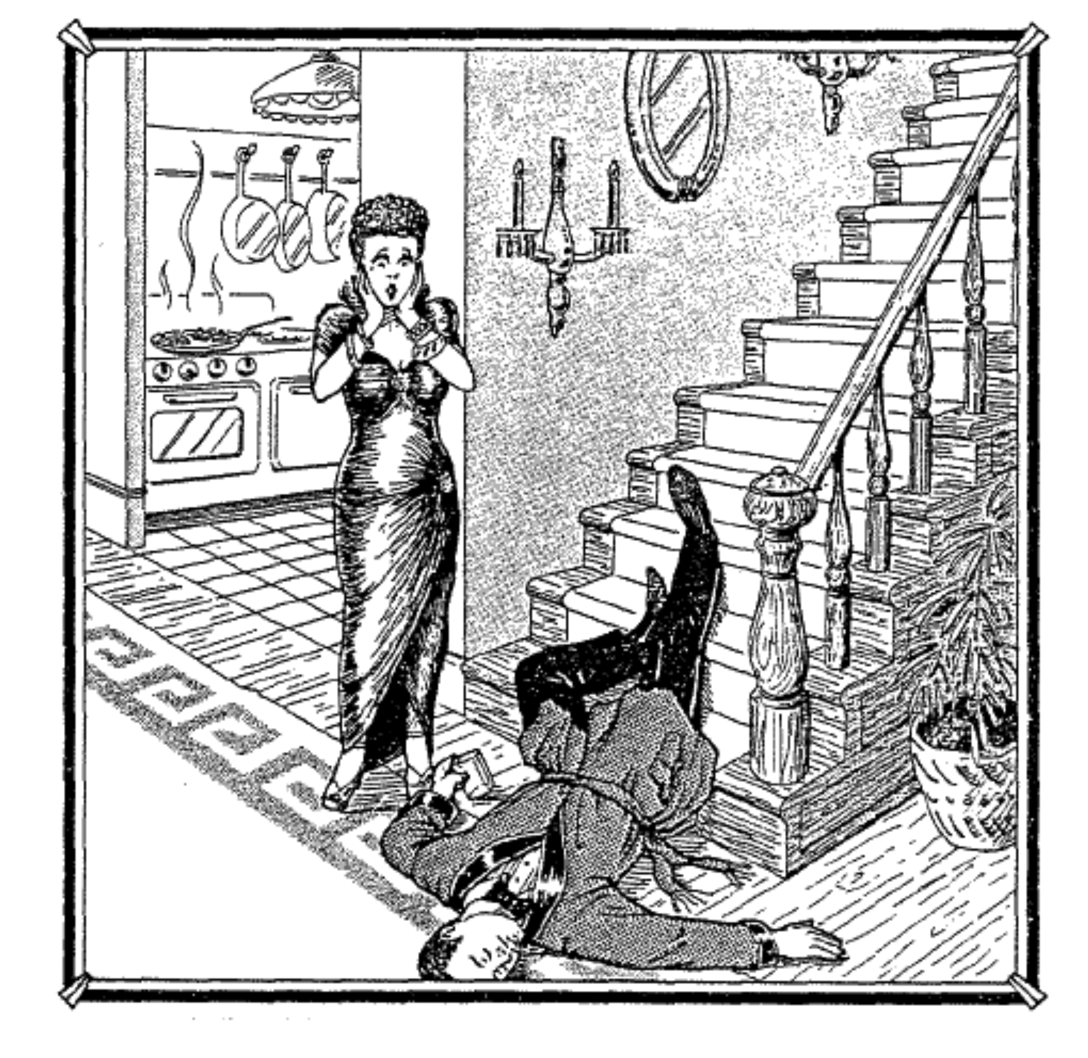
We are going to be the investigators who try to determine what what really happened at this scene.


Image result for slip or trip image
The way he landed - tried to save himself
Heat on the stove indicates that it has been on for while.


I'm noticing
I'm wondering
I'm seeing
I'm thinking
I'm feeling

Lots of alternative ideas/point of view
More animated
Pairs, then small groups then report back

How to Meta?

How did you work with other to figure this out?
What are some ways a group member challenged your thinking? How did that feel? What made it safe?
Where able to challenge others' reasons or ideas?
List some of the things a partner noticed or said that shifted your thinking.
List some things you noticed or said that helped the inquiry.
List some things your groups could do better next time.


I wonder if... (people sharing ideas without influence others ideas.)
Being comfortable with ambiguity/mystery.
Check ins with individuals and groups.

Roles in the group - Referee or Time Keeper / Encouraging or Motivator


Our Norms
We are accountable 

Those doing the reading thinking and talking are the ones doing the learning.

How do our norms change with being digital. 

https://kiwikidsnews.co.nz/  

Negotiate social norms in a gaming or media situation.

Provocation
What if this were the way we went about teaching?
What would it take  to be successful?

Monday, 27 August 2018

SOLO - Structure of the Observed Learning Outcome.

SOLO can be used in all areas of learning to help triangulate where students are at. It was developed are researching samples of students thinking in many different subjects and levels.

This model helps to describe the structure of learning, making it clear to students and teachers. It doesn't matter if it is an activity, inquiry unit or class programme. There are five levels of understanding and students can be working at any one of them. This works well of transferable skills and specific skills.

SOLO helps students to build meta-cognition, self regulation, self- efficiency, engagement and resilience in learning.

Helping everyone to discuss what they are doing, how well it is working, and what should or could happen next.

I like how the five levels can be broken into pre, surface, deep and conceptual or constructed knowledge.


As a Staff we decided to make it relevant to our students by breaking the 5 levels into pictorials and words our students would understand. Whanākitanga Whare Year 5 and 6's come up with a balloon party visual.

Friday, 17 August 2018

Digital Fluency - Session 9 (Final Day) Ubiquitous Learning

Ubiquitous Learning

The main time for learning is 9am to 3pm. However, with digital learning, we can stretch out the hours of the school day.  Not expecting anyone to work 12 hours a day. But students have the option to choose when they want to do extra learning that many take for granted that others in lower decile schools don't have the chance to, due to circumstances. - It is not just children glued to a screen 12 hours a day. 

Middle-income families come to school with 300 000 words lower-income children don't always. The summer learning journey helps to continue this ubiquitous learning.

Digital Fluency Final Reflection

The last nine weeks have been awesome. I have learnt a lot and passed level Google Level Two. We have had a range of giggles at silly mistakes that have aided our learning. And there have been times where throwing the Chromebooks might have felt like it could have solved the problem. The Friday sessions will be missed, but we can use other means to catch up and revisit what we have learnt, such as 'google meets' and screencastify. I would like to thank Manaiakalani Educational Trust for providing the funding for this programme, Gerhard and Dorothy for all their input and support in leading the programme.

Before and after, bright-eyed and bushy-tailed in Week 5 Term 2 and now brain overload Week 4 Term 3.

Friday, 10 August 2018

Google Email - Update

Google Mail has some exciting new features. The idea of seeing my calendar or keep as I check emails and can add to them directly from gmail is an awesome experience.

This set of slides I presented at the latest Kootuitui Unconference.

Digital Fluency - Session 8 Empowerment

Cybersmart

Digital Citizen building values for the future in a positive manner.

Term 1 - Smart Learners 
Term 2 - Smart Footprint - Right place at the right time, what is private and what can be shared publicly
Term 3 - Smart Relationships - Connecting with other people, commenting


These fit into literacy. Juniors may focus on Smart Learners and Relationships.

This site is for teachers to use and modify for the purpose of their school, classroom. And should be used in one lesson a week and not just the year you start it is an ongoing tool, as challenges change and classes change.


No negative talk. No referring to cyberbullying. No matter what is your tool it is bullying. This term minimizes this type of bullying and the phrase cyber makes it flash.
A BULLY IS A BULLY!

When something goes wrong take a screenshot. Now no longer a victim you are now empowered. Then email it to 3 adults, because yes adults are busy. 

Hapara

Hapara is empowering as teachers have access to filed and unfiled work. Check sharing and unshared work or work put in the bin. You know that child who never finishes and always drops it in the bin. By checking out the blogs and comments link in Dashboard, you can quickly scan comments students are receiving. Hovering over the title of the comment will expand it so you can read who sent the comment.

You can label students into groups for reading, writing and math (although you need to do this for each folder/subject).


SMURF it - saying to remind students what to do when they open a file.

S - Stop
M - Make a copy
R - Rename it
F - File it

Fusion

You can access and ask for support independently using a ticket system. And through extensions.

Digital Dig 


i-pads

Are not designed as a shared device. There is more to using an i-pad than just busy apps. Of course, all students love whacking a screen. Explain Everything is the main tool, expert teachers have sat and made the tasks for students. These are saved back to their folders and are accessible from Hapara.
What happens at home on an i-pads is different to what happens at school on an i-pad. It is learning the teacher has created.

It is important to start with how to hold an i-pad, looking after it, where to save work and how to open explain everything. How you take a photo and build relationships, "Can I take your photo?" Taking photos is through 'Explain Everything', not the camera role.

Saturday, 4 August 2018

Digital Fluency Session 7 - Creating Visible Learning

Making Learning Visible

Learning should be available to those who want and need it. Not everyone needs the same tools or equipment to succeed. Giving 3 people the same yellow bucket/stool doesn't make what is available on the other side of the wall accessible to everyone. Some people need more support with their learning to achieve.


Using Class Websites to make Learning Visible and Accessible.

Learning should be reachable in 3 clicks when accessing a class website. Otherwise, students and whanau lose interest as too hard to find learning. By keeping the year's activities, learning is available at any time and all learning is rewindable. So if they forget or missed a day of school they can check out how it is done and refresh learning for themselves or move ahead when finished.

Storing previous learning is referred to as archiving work, students can find it easily through buttons. A dropdown option can be tricky as mouse control is developing and the mouse can easily slip off the drop-down menu. (We have all done it and had to start over, especially if one dropdown leads to another and another.) Now don't get me wrong they do have a place. Just remember could hinder students learning.


We looked at a range of class sites old and new, to find ideas we like and what combinations of colour, buttons and features work well. I still struggle with weekly slides showing learning and find I am doubling up with planning and then repeating learning intentions and success criteria on learning tasks, as "ERO doesn't do Google". Hopefully, I am misinformed. But I do like multi models where children can select learning they want to know more about and create learning in a meaningful way for them, then share through blogs (Tuhi Mai Tuhi Atu is a great way to get other learners looking at students blogs giving them value and an authentic audience). 


Buttons

Buttons can be an easier way for students to access learning and they can be fun. Buttons can be personalised with photos, other images or words. They can be used to locate subject areas or archived work.


Google Keep

Looking at Google Keep is a great way to track ideas, shopping lists and to-do lists. With checkboxes, you can mark off when you have picked up items or share the list so someone else can pick them up on the way home.  If you have a lot going on you can give set reminders by time or location. So as you drive home your reminder goes off as you go past your next stop. Genius! I wonder if it will remind me to get off the train at the right point so next week I can catch the train to Papakura rather than end up at Manukau again. (Two weeks in a row, but the only one counting is my husband.)

The most exciting part of Google Keep was its ability to type up text. Not just from the microphone (which is great if you want to take notes while talking). But also from an image of text, both previously typed and handwritten.

Google Keep can be added to your phone, here you can easily take photos of text from cards books or journals. Then click on the 3 vertical dots and you can add labels, this helps for finding the note again and categorising. You can even colour code them. There is an option here to grab image text and google retypes the text for you to use. This is great if you have a single text and you wish for a group to use it you can then copy and paste it to anywhere you like, slides, docs, drawings...

If there is a slight mistake after the grab you can even edit the text.

Here is what the notes look like with the text grab.


Google Exam


Exciting within 24 hours we knew whether or not we had passed. It was a great feeling and we are were ready to share our knowledge with a Kootuitui Toolkit.

Even though we nervous going in, it was good to know it was google and so long  as we didn't 'Google' every question we would have time to finish. Although I feel I shouldn't have spent as much time on the short answer questions.

Pace yourself - allow 1 hour for multi-choice and then monitor your time for the senarios or time will get away on you.

To check you are ready you can read up or try the review question at the end of each Unit.


Post Grad: Session 1 - Collaboration

   This is showing the pathway to Master's. Creating Connections and Collaboration I thought it was interesting that the experts couldn...